
Garmin Smart Turbo Trainers
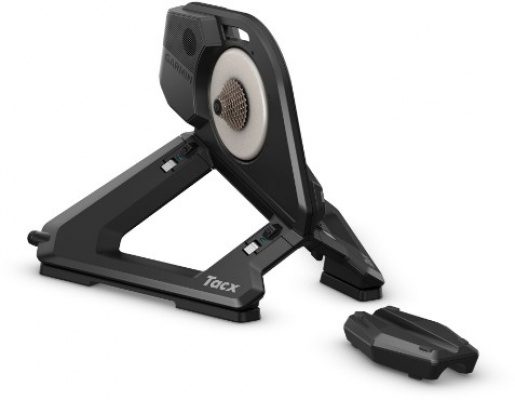
Garmin smart turbo trainers give UK riders a serious way to keep training when the roads turn grim - and if you've ever tried to stay motivated on a basic roller through a wet January, you'll appreciate what that means. Built on the Tacx architecture Garmin acquired and refined, this range spans from accessible wheel-on units right up to flagship direct drive trainers that can simulate gradients of up to 25% and deliver sub-one-percent power accuracy. That's the kind of precision that matters whether you're following a structured ERG mode plan or chasing a Zwift race up the Alpe.
Connectivity is dual-band across the range - ANT+ FE-C and Bluetooth Smart - so pairing with your laptop, tablet, or a Garmin Edge computer is straightforward. The quieter magnetic resistance units are a genuine consideration if you're in a terraced house or a flat with neighbours below. These aren't just trainers you plug in and forget, either - they feed data directly into Garmin Connect, sync automatically to Strava and TrainingPeaks, and talk natively to the Tacx Training app. Serious indoor training, sorted.
Prices and availability can change quickly. Delivery charges are not always included in listed prices.
Final price, stock status and delivery terms are set by retailer. We may receive a commission on purchases made.
How the Tech Ecosystem Fits Together
The garmin tacx smart trainer range earns its reputation partly through connectivity that just works. Every model broadcasts over both ANT+ FE-C and Bluetooth Smart simultaneously, which means you can run Zwift on a laptop via ANT+ while a separate Bluetooth connection feeds data to your Garmin Edge - no dongles, no faff, no choosing between devices. That dual-band setup is one of those things you don't think about until you're stood in a cold garage wondering why your trainer won't pair, so it's worth calling out.
On the software side, Garmin Connect acts as the central hub. Workouts completed on the trainer sync automatically and push out to Strava or TrainingPeaks without you touching anything. The native Tacx Training app adds a library of structured workouts and virtual routes filmed in real locations - useful if you want something more immersive than a plain ERG session but don't want the full Zwift subscription. For garmin trainer zwift compatibility, the pairing process is plug-and-play: open Zwift, hit the pairing screen, and the trainer appears under both 'Power Source' and 'Controllable'. It typically takes under a minute. If you're also running a Garmin HRM strap, that feeds into the same ecosystem seamlessly - one less thing to manually log.
Ride Feel and What the Numbers Actually Mean
Power accuracy figures are where the range splits into tiers. Entry-level units sit around 2.5% variance - fine for general fitness work and following training zones, but not what you'd stake race preparation on. Step up to the premium direct drive models and that figure drops to under 1%, which puts them in the same conversation as dedicated Garmin power meters. For most riders doing structured winter base work, the mid-range is plenty. If you're a data obsessive or training with a coach, the top-end figures remove any doubt.
The best garmin indoor trainer models - specifically the Neo series - include dynamic inertia, which modulates resistance to mimic the momentum of a real bike. It's the detail that stops indoor riding feeling like pedalling through treacle. There's also a road feel simulation feature on premium units that replicates surface texture: cobblestones, gravel, even cattle grids. It sounds gimmicky until you've ridden one - the subtle vibration through the cranks keeps your brain engaged through long sessions in a way that flat resistance never does. The flywheel on direct drive units is heavy enough that the dead spot at the top of the pedal stroke disappears, which rewards a smoother pedalling style and, over a winter, genuinely improves technique.
Noise is a real-world factor. Magnetic resistance units are noticeably quieter than wheel-on trainers with tyre contact - important if you share walls or have a training space above a living room. The Neo models are among the quietest trainers on the market full stop. Worth comparing against Wahoo's KICKR range or Elite's direct drive options if noise is your primary concern - all three are close, and it genuinely comes down to budget and ecosystem preference.
Getting Set Up: Cassettes, Garages, and UK Winter Realities
Direct drive trainers require you to fit a cassette directly to the trainer's freehub body - your rear wheel comes off entirely. The cassette needs to match your bike's drivetrain: 8, 9, 10, 11, or 12-speed depending on your groupset. Check the specific model's freehub compatibility before you buy, as some Shimano HG and SRAM XD bodies are not interchangeable. Most trainers don't include a cassette in the box, so factor that into your budget. Some premium bundles do include one pre-fitted, but verify before assuming.
Garmin turbo trainer setup for a direct drive unit takes around fifteen minutes the first time - remove the rear wheel, slide the thru-axle or quick-release skewer through the trainer's dropout adapters (these vary by axle standard, so check your bike's spec), fit the cassette with a lockring tool, connect the power cable, and pair. It's not complicated, but doing it once in a warm room before race season beats fumbling with cold hands in February.
Speaking of cold: UK garages drop well below the temperatures these trainers are tested at in ideal lab conditions. Condensation on electronics is a genuine issue in unheated spaces. A few habits help - let the trainer warm up gradually before hammering ERG intervals, wipe down metal contact points after sweaty sessions, and if your garage gets genuinely damp, store the unit indoors between sessions. None of this is unique to Garmin, but it's worth knowing before you commit a premium trainer to a garden shed.
For everything else you need to complete your indoor setup - mats, front wheel blocks, sweat management - head to our Garmin Turbo Accessories page, where we've pulled together the kit that makes long sessions on the trainer genuinely more comfortable.
Garmin Smart Turbo Trainers FAQs
How do I connect my Garmin smart trainer to Zwift?
Make sure the trainer is plugged in and powered on - it'll start broadcasting over Bluetooth Smart and ANT+ automatically. Open Zwift and go to the pairing screen. Select your Garmin trainer under both 'Power Source' and 'Controllable'. The whole process typically takes under a minute on a device that's paired before.
Do I need to buy a separate cassette for my Garmin direct drive trainer?
Yes, in most cases. Direct drive units require a cassette fitted to the trainer's freehub body, and it needs to match your bike's drivetrain speed - 8 through 12-speed depending on your groupset. The cassette isn't usually included in the box, though some premium bundles come with one pre-installed. Always check the spec before buying.
Can I use a Garmin turbo trainer without plugging it in?
Premium models like the Garmin Tacx NEO 2T are self-powered - they generate electricity from your pedalling, so mains power isn't required for standard use. The one exception is downhill simulation, where the trainer drives the cranks forward; that feature needs a wall outlet. Mid-range and entry-level units require mains power throughout.