
Hdrop Gps & Sports Watches
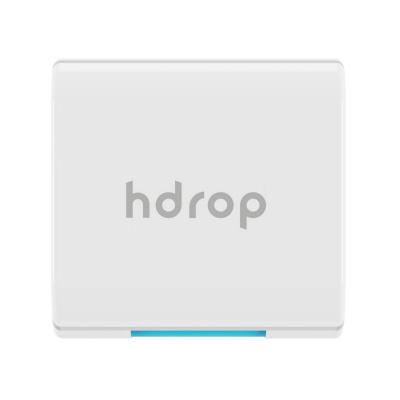
hDrop GPS & Sports Watches represent a genuinely different approach to cycling data - not another heart rate or power metric, but real-time sweat and electrolyte monitoring delivered straight to your screen. Most riders are flying blind on hydration. You know your watts, your cadence, even your sleep score, but the moment your sodium drops on a long ride, none of that data saves you from cramping into the verge somewhere outside Shrewsbury.
hDrop fills that gap. Rather than replacing your existing head unit or smartwatch, it works alongside it - pairing with Garmin GPS & Sports Watches, COROS watches, and other ANT+ or Bluetooth-compatible devices to feed live hydration data into your activity display. It tracks how fast you're sweating and how much sodium you're losing, so you can make informed decisions about when to drink and what to reach for - a plain water bottle or an electrolyte tab.
That matters whether you're deep into a humid summer sportive or grinding through a January turbo session where sweat rates spike in a heated room. British riding throws both at you. hDrop handles both.
Prices and availability can change quickly. Delivery charges are not always included in listed prices.
Final price, stock status and delivery terms are set by retailer. We may receive a commission on purchases made.
Pairing hDrop with Your Watch and Head Unit
hDrop operates as a companion sensor, not a standalone device. It broadcasts over both ANT+ and Bluetooth Smart (BLE) simultaneously, which means it'll talk to virtually any modern cycling computer or smartwatch without fuss. That dual-protocol approach is genuinely useful - you're not locked into one ecosystem.
For Garmin users, the setup process is straightforward. Download the hDrop data field from the Garmin Connect IQ store, open your chosen activity profile on your watch or head unit, and let it scan for the sensor. It pairs automatically via ANT+ and the hydration metrics appear on screen within the activity. There's no fiddly manual code entry. Once it's paired, it stays paired. After your ride, sweat rate and electrolyte data syncs through Garmin Connect and can be pushed to TrainingPeaks or Strava for session-by-session hydration analysis - useful if you're building a picture of how your sweat response changes across different conditions or intensities.
If you ride with a Polar watch or another BLE-capable device, the Bluetooth Smart broadcast covers you there too. Worth checking your specific device's compatibility before you buy, but the coverage across common cycling tech is broad. The key point: hDrop slots into your existing setup rather than demanding you rebuild it.
Accuracy, Battery, and Cold-Weather Caveats
The sensor uses a non-invasive optical sensor to read sweat rate and sodium concentration through the skin. No needles, no patches you throw away after one use - it's a wearable you charge and reuse. The sweat rate data is calculated continuously, with real-time electrolyte tracking updating your display as conditions change during the ride.
Battery life is rated at up to 24 hours of continuous use on a single charge. In practice, expect figures in the 20 - 24 hour range depending on ambient temperature. Cold air is harder on lithium cells, so a long winter audax in sub-zero conditions might shave a couple of hours off that headline figure. For most UK riders, even back-to-back sportive days, that runtime is more than sufficient.
Here's something worth knowing before you head out on a freezing December morning: the sensor needs you to actually be sweating before it can read meaningful data. In cold weather, that can take 10 to 15 minutes of riding before your body produces enough sweat for the sensor to establish an accurate baseline. Don't look at the screen after two minutes in the cold and assume something's wrong - give it time. Once you're generating heat and moisture, the readings stabilise quickly. On the turbo trainer in a warm garage, it locks on almost immediately, which is part of why hDrop is particularly well-suited to structured indoor sessions where sweat rates are consistently high.
Placement, Fit, and Keeping It Working in UK Conditions
Upper arm placement is the standard recommendation for cyclists, and it makes sense. Mounting it on your wrist introduces interference from handlebar vibration and can conflict with your watch position. The upper arm keeps the sensor stable against the skin, away from aero kit that might compress or dislodge it, and clear of the forearm movement you get during gear changes and braking.
On waterproofing: the hDrop sensor carries an IP67 rating, which means it's fully sealed against dust ingress and rated to withstand immersion in water up to one metre for 30 minutes. For UK riding, what that translates to practically is: it'll handle a full Welsh autumn soaking, road spray from lorries on an A-road, and the kind of biblical April shower that appears from nowhere on the South Downs. It's not going to flinch. The one caveat - make sure the charging port is dry before you plug it in after a wet ride. Give it ten minutes and a quick wipe, and you'll avoid any corrosion issues over time.
Maintenance is minimal but worth doing consistently. Rinse the strap under clean water after every ride, and wipe the sensor contact pins with a damp cloth to clear salt residue. Sweat is corrosive over time, and salt build-up on the pins is the most common reason optical sensors drift in accuracy. It takes 30 seconds. Do it every time and the sensor stays reliable for much longer.
If you're building out a broader training setup, pairing hDrop data with a capable watch makes sense - check what's available across Garmin's GPS watch range and COROS's lineup to find the head unit that suits your budget and feature priorities. hDrop layers on top of whatever you're already running.
Hdrop Gps & Sports Watches FAQs
How do I connect my hDrop to a Garmin watch?
Grab the hDrop data field from the Garmin Connect IQ store and install it to your watch or head unit. Power on the hDrop sensor, then open your activity profile on the Garmin and let it search for fitness sensors - it'll find and pair via ANT+ automatically. Your real-time hydration metrics will show up on the data field during your next activity.
Is the hDrop sensor waterproof enough for UK rain?
Yes. The IP67 rating means it's fully protected against dust and can handle heavy rain, road spray, and brief submersion. It won't miss a beat on a wet British ride. Just dry off the charging port before you plug it back in - that's the only step worth being careful about after a soaking.
How long does the hDrop battery last on a single charge?
Up to 24 hours of continuous tracking on a full charge, with real-world figures typically landing between 20 and 24 hours depending on temperature. Cold conditions can trim the top end slightly, but it's comfortably enough for ultra-endurance events or consecutive training days without needing to recharge between sessions.